Most solo contractors quote by text message and start the job on a verbal yes. That works, until it doesn't. One dispute, one customer who "didn't realise that was included," one unpaid invoice, and the cost of a single unsigned quote outweighs every job you've ever saved time on by skipping a signature.
This isn't a legal scare piece. eSignature on a quote is a practical business habit, one that costs your customer 30 seconds and costs you nothing, but gives you a documented approval record for every job before you lift a single tool.
Here are the five reasons solo contractors who use it don't go back.
A verbal yes has no legal weight, and you already know this
Every solo contractor has had the experience. You give a price, they say "sounds good," you show up, do the work, and somewhere between the job finishing and the invoice arriving, the story changes. The price is suddenly a surprise. The scope wasn't what they expected. They thought it included something it didn't.
A verbal agreement is almost impossible to prove. A text message thread is better, but still ambiguous, prices mentioned in conversation don't constitute an accepted quote. What you need is a record that shows the customer saw the price, read the scope, and actively approved both.
That's exactly what a signed quote gives you. Not a court document, just a timestamped record that a specific person approved a specific price for a specific scope of work. For most disputes in residential trade work, that's all you need to resolve the situation before it escalates.
A plumber quotes a bathroom fixture replacement for $480. Customer says "yeah that works" over text. After the job, they push back on the invoice claiming they thought it was $380. Without a signed quote, there's nothing to point to. With a signed quote, the conversation ends in 30 seconds.
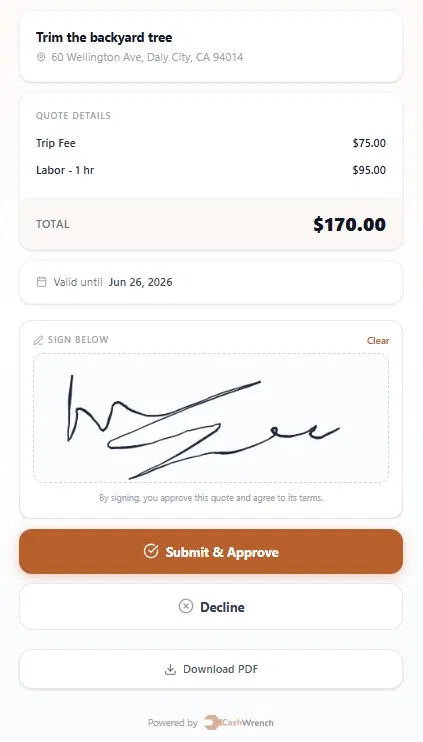
The customer signing screen in CashWrench, your customer reviews the line items, signs with a finger, and taps "Submit & Approve" right from their phone
Scope disputes are a solo contractor's biggest financial risk
Price disputes are annoying. Scope disputes are expensive. When a customer claims the job should have included something it didn't, the argument isn't about $20, it's about whether you need to go back and do more unpaid work, or whether you eat the cost of the disagreement to protect the relationship.
For a solo contractor with no business partner to defer to and no customer service team to handle the call, scope disputes land entirely on you. They cost time, they cost money, and they're deeply unpleasant. Most solo contractors absorb them rather than fight because the fight itself costs more than the job.
A line-item quote that the customer signs makes scope visible before the work starts. If it's on the quote and they signed it, it's agreed. If it's not on the quote, it's extra work, and you can have that conversation from a position of documentation rather than memory.
"I thought you were going to repaint the trim too." Now you're either absorbing three extra hours or damaging the relationship arguing about what was said at the front door.
"Here's the quote you approved, trim wasn't included. Happy to add it as a separate job." Clean, professional, no argument.
Signed quotes close faster, the signature creates commitment
There's a behavioural reason eSignature improves close rate that has nothing to do with legal protection. The act of signing, even digitally, even with a finger on a phone screen, creates a different psychological relationship with a decision than passively saying "yeah OK."
Customers who sign are committed. Customers who verbally agreed are still in considering mode. That difference shows up in how quickly they respond to your follow-up, whether they reschedule, and how smoothly the job moves from quote to scheduled work.
Sending a quote link via SMS with a signature prompt filters out time-wasters faster too. A customer who was gathering comparison quotes and never intended to move forward simply won't sign, and you find that out in hours rather than after blocking off two weeks of schedule for a job that was never happening.
You finish the walkthrough, build the quote on your phone, tap Send. The customer gets an SMS link, reviews the line items, signs with their finger, and taps Approve. You get a push notification. The job is scheduled before you've driven off the street.
The paper trail protects you if payment goes wrong
Most solo contractors don't pursue unpaid invoices through formal channels because it's expensive and time-consuming. Small claims court costs time. Collections agencies take a cut. The practical response is to write off the invoice and move on, which means absorbing the loss entirely.
A signed quote changes the calculus. When you have a timestamped record showing the customer approved the scope and price, your position in any payment dispute, whether it's small claims, a chargeback through a payment processor, or just a firm conversation, is materially stronger. You're not arguing from memory. You're presenting documentation.
This also matters for credit card chargebacks specifically. When a customer disputes a charge with their card issuer, the merchant (you) needs to provide evidence that the work was agreed to and delivered. A signed quote combined with a completed job record is the strongest possible evidence package for winning that dispute.
Signed quote (with timestamp and IP) + job record showing completion date + any before/after photos. That combination handles the vast majority of payment disputes before they escalate.
In the CashWrench quote record, an approved quote carries an "Approved" status badge, the customer's drawn signature, the signed timestamp, and the IP address, all captured automatically the moment they tap Approve. Nothing for you to file, scan, or remember.
It signals professionalism before the job even starts
Customers who hire solo contractors have often had bad experiences with contractors who disappeared, overcharged, or delivered work that didn't match what was discussed. The expectation of a signed quote, presented naturally, as part of your normal process, immediately separates you from that group.
When you send a professional quote via SMS with a signature option, you're communicating something beyond the price. You're saying: I operate like a business. I document what we agree to. I take my work seriously enough to have a process. That signal is worth money, not in a single job, but in referrals, repeat business, and your ability to charge what your work is actually worth.
The contractors who struggle to hold price are often the ones whose process looks like they're guessing. A quote that arrives by text with a clean signature link looks like it came from someone who knows what they're doing, because it did.
A customer who receives a quote with a digital signature step is more likely to trust the price, less likely to haggle, and more likely to refer you to someone else, because you gave them a professional experience from the first interaction.
A signed quote isn't paperwork. It's the moment a potential job becomes a confirmed one.
Every quote you send through CashWrench includes a signature link. Your customer gets an SMS, reviews the line items on their phone, signs with their finger, and taps Approve. You get a push notification instantly. The signature, timestamp, and IP address are saved to the job record automatically, no extra steps.
Included in the Starter plan at $19/month. No add-on required. See how eSignature works →
Frequently asked questions
Does a contractor need a signed contract for every job?
What happens if a customer disputes an invoice without a signed quote?
Is an eSignature on a contractor quote legally binding?
How do I get customers to sign quotes before a job starts?
What is CashWrench?
Get every quote signed. Two months free.
Send quotes via SMS. Customers sign on their phone. Job confirmed before you leave the driveway. Two months free, no credit card, cancel anytime.