Handing a piece of software access to your money is a fair thing to be nervous about. So let's be precise about what CashWrench can and can't see: your bank account number never touches our servers, and neither does your customer's card number. Every dollar moves through Stripe, the same payment infrastructure used by Amazon, Shopify, and Lyft. Here's exactly how it works, screenshots included.
The short version: CashWrench stores zero bank account numbers and zero card numbers, yours or your customers'. Everything financial is handled by Stripe, a PCI Level 1 certified processor.
Why this matters more than most software decisions
Most software decisions are about features. This one is about exposure. The moment an app touches your bank account, or your customer's card, it becomes a target, and a liability, and a compliance headache for whoever built it.
Small software companies are exactly the kind of target attackers look for: smaller security teams, less scrutiny, and, if they're storing financial data directly, a single breach that exposes thousands of bank accounts at once. That's not a hypothetical. It's the reason payment processors like Stripe exist in the first place: so that the businesses building apps on top of them never have to become that target.
CashWrench made a deliberate choice early on: never touch raw financial data, ever. Not your bank account. Not your customer's card. Not even temporarily. Every payment-related action, connecting your account, accepting a card, issuing a payout, happens inside Stripe's own secure infrastructure. CashWrench just tells Stripe what to do and listens for the result.
Your bank account lives inside Stripe, a company that processes payments for millions of businesses and is independently audited every year. CashWrench stores a reference ID, a string that means nothing outside of Stripe's systems, and nothing else.
Connecting your bank account: the "Get Paid" screen
When you're ready to start accepting customer payments, you'll see the "Get Paid" card on your CashWrench dashboard. It explains upfront what's about to happen: you'll connect a bank account so customers can pay invoices directly into it, and CashWrench never stores your bank details, only Stripe does.
Tap "Add your bank to get paid" and CashWrench redirects you to Stripe's own onboarding flow. This is Stripe's interface, running on Stripe's servers, asking for your information directly. Stripe verifies your identity and links your bank account, typically takes about 5 minutes.
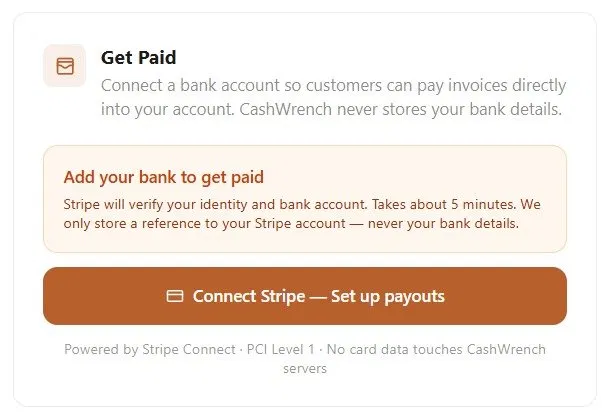
The "Get Paid" card before connecting, tap "Add your bank to get paid" and you're handed off to Stripe's secure onboarding flow
You're briefly taken off cashwrench.com and onto a stripe.com domain. That's intentional, it's how you can confirm you're handing your bank details to Stripe, not to CashWrench. Once you finish, Stripe sends you back to your dashboard automatically.
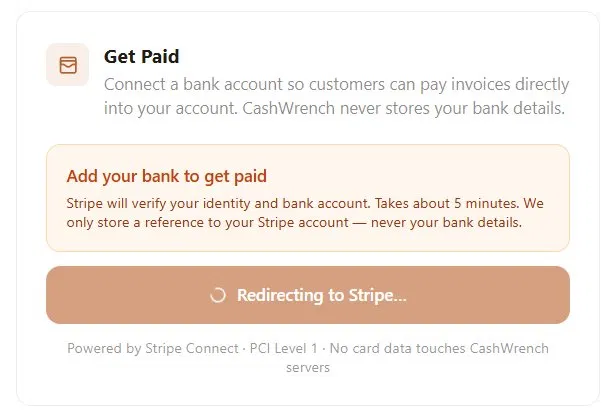
After Stripe onboarding, the card updates to the connected, payouts-enabled state, confirming your account is ready to receive customer payments
Once you've completed Stripe's setup, the same card updates to show "Connect Stripe, Set up payouts" has been completed, confirming your account is linked and ready to receive customer payments.
Notice the footer on both screens: "Powered by Stripe Connect · PCI Level 1 · No card data touches CashWrench servers." That line isn't marketing copy, it's a literal description of the system architecture. CashWrench's servers are not in the path between your bank account and Stripe at all.
How your customers pay, and what CashWrench sees
The same principle applies in reverse when a customer pays an invoice. When you send an invoice with a "Pay Now" link, the customer taps it and is shown a Stripe-hosted payment form, embedded to look like part of your invoice, but functionally running on Stripe's secure infrastructure.
The customer types their card number directly into that Stripe form. The card number is sent straight to Stripe's servers over an encrypted connection. It never passes through CashWrench's backend at all, not in transit, not at rest, not even for a millisecond of processing.
| Data | Who sees it |
|---|---|
| Customer's card number, CVC, expiry | Stripe only |
| Your bank account & routing number | Stripe only |
| Payment amount, status, invoice ID | CashWrench (from Stripe's webhook) |
| Stripe account reference ID | CashWrench (a pointer, not a credential) |
How money actually moves, step by step
You connect your bank account through Stripe
You complete Stripe's onboarding (identity verification + bank linking) once. CashWrench receives back only a Stripe account reference, a string like an ID badge number that's meaningless without Stripe's systems behind it.
You send an invoice with a "Pay Now" link
The invoice itself, line items, totals, due date, lives in CashWrench. The payment link points to a secure Stripe-hosted checkout session created specifically for that invoice.
Your customer pays directly through Stripe
The customer enters their card details into Stripe's form. Stripe processes the charge, handles fraud checks, and confirms the result, all without that card data ever reaching CashWrench.
Stripe notifies CashWrench the invoice was paid
Stripe sends a confirmation event back to CashWrench, just the facts: which invoice, what amount, paid or failed. CashWrench updates the invoice status and notifies you. No card data is included in this message.
The event CashWrench receives looks like "invoice #1042, $480.00, paid", not a card number, not a name on the card, not an expiration date.
Stripe deposits the money into your bank account
On Stripe's standard payout schedule, the funds land directly in the bank account you connected during onboarding, typically within 1-2 business days. CashWrench never holds or routes the money itself.
CashWrench's job is to manage your jobs, quotes, and invoices. Stripe's job is to move money. We stay in our lane, on purpose.
What CashWrench stores vs. what Stripe stores
To be completely transparent, here's the dividing line in plain terms. CashWrench's database holds your business data: jobs, customers, quotes, invoices, photos, messages, and a reference ID pointing to your Stripe account. That's it on the financial side, a pointer, not a credential.
Stripe's systems hold everything that could actually be used to move money: your bank account and routing numbers, your customers' card numbers, and the verification documents used to confirm your identity during onboarding. Stripe is the only party, including CashWrench, with access to that data.
Frequently asked questions
Does CashWrench store my bank account information?
Does CashWrench store my customers' card numbers?
Is Stripe PCI compliant?
How long does it take to connect my bank account on CashWrench?
How fast do I get paid after a customer pays an invoice?
What is CashWrench?
Get paid without the worry. Two months free.
Connect your bank account through Stripe in about 5 minutes. Send invoices, get paid directly, and never wonder where your data lives. Two months free, no credit card, and PCI Level 1 security via Stripe from day one.